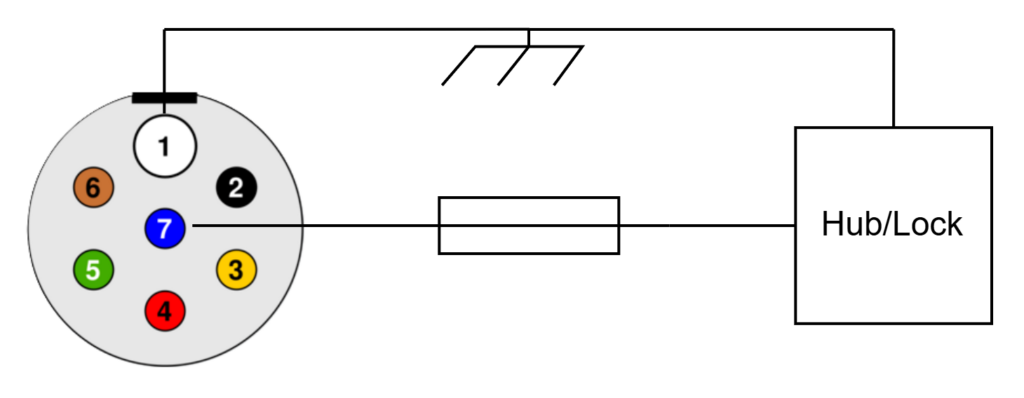
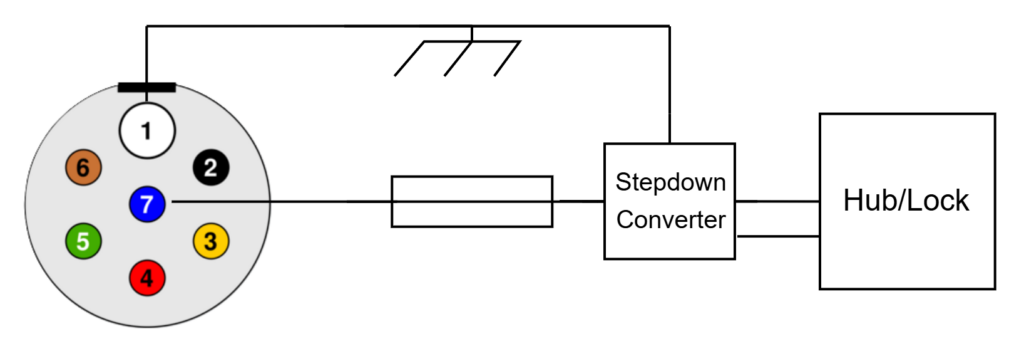
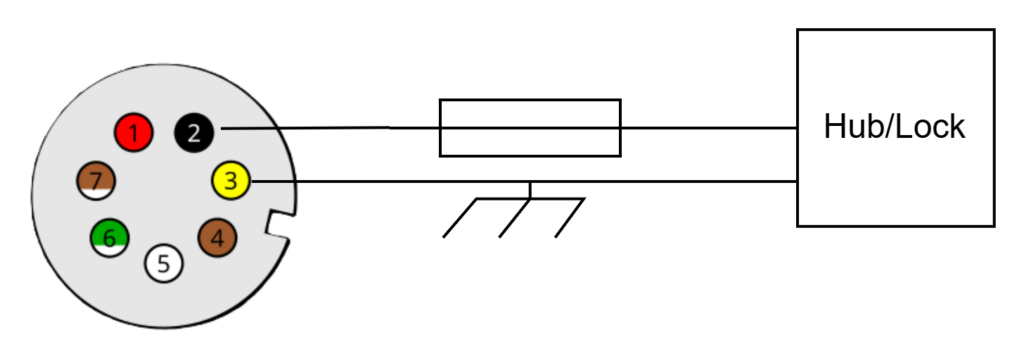
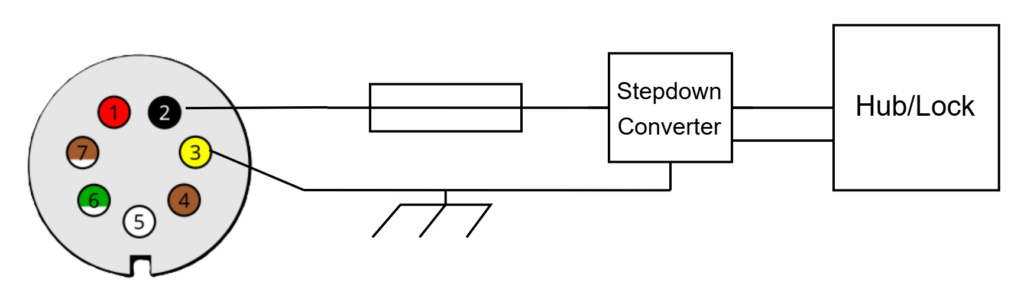
Warning: Always refer to the official wiring diagram for your specific trailer, power unit, or tractor equipment before beginning any installation. Electrical systems may vary, and incorrect connections can cause damage or inhibit system functionality.
Important: The power supply line must have a fuse installed to protect against electrical faults. This is mandatory for both the Admiral Hub and the Admiral Lock.
The Admiral Hub requires a 12V DC power supply for operations and to recharge its internal battery. The Admiral Lock can optionally be powered externally; if not connected to a power source, it will operate on its internal battery. Both devices are optimized for 12V systems and have an average current draw of approximately 500mA.
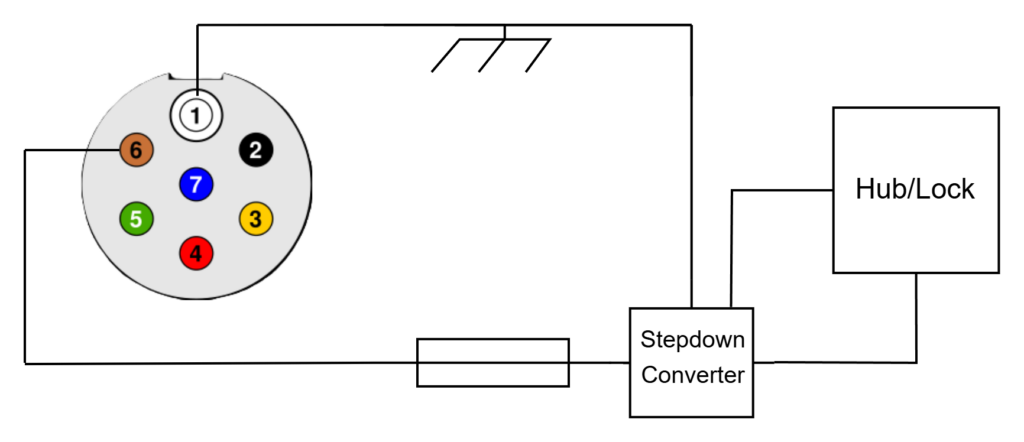
For installations on 24V systems, a 24V-to-12V down converter must be used to supply appropriate voltage levels to the Admiral Hub and Lock. Using 24V directly without a converter will damage the units.
When integrating the Hub with an immobilizer, it is critical that the power supply is switched via the vehicle’s ignition. This ensures that immobilization functions properly when the asset is parked and prevents inadvertent unlocking. Refer to the included wiring diagrams for proper ignition-switched connections.
Do not connect the Hub to a permanent battery source, as this will disable the immobilization function when the vehicle is parked and turned off.
Additionally, avoid connecting to ISO 12098 15-pin connectors, as these supply continuous power and do not include an ignition-switched signal. Use only the specified ignition-switched power lines as shown in the standard wiring diagrams.
The following diagrams are provided for reference and show compliant power connections:
This manual provides installation, operation, storage, and transport guidelines for the Admiral Lock. Please read this manual carefully before installing and operating the Lock.
Applicable Hardware Versions: Admiral Lock v1.3
Intended Audience: Fleet managers and operators
Purpose: Installation, operation, and safety guidelines for Admiral Lock
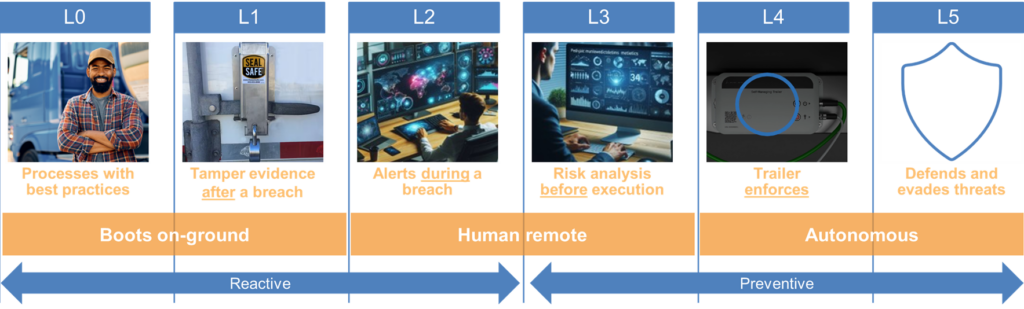
The Admiral Lock is an integral component of Level5Fleet’s L4 autonomous security suite, designed to secure cargo doors on trailers, box vans and containers both in yards and during transit. Its robust design and interior installation ensure that it remains inaccessible to tampering, providing a high level of protection against unauthorized access.
The Lock can function as a standalone security device or in conjunction with the Admiral Hub. When paired with the Hub, it gains additional automation features, enabling automatic locking and unlocking based on geofencing. This ensures that security operations are seamlessly managed as assets enter or exit designated areas without requiring manual intervention.
Beyond securing cargo, the Admiral Lock enhances container tracking capabilities. When installed on Admiral-equipped containers and paired with an Admiral-equipped chassis, it enables real-time tracking of container movements. The system continuously records mounting, dismounting, and transfers between assets or vessels, ensuring a comprehensive log of container status throughout its journey.
Communication between the Admiral Lock and the Admiral Hub is established via Bluetooth. In standalone mode, WiFi connectivity allows for remote locking and unlocking, providing operators with greater flexibility. The Admiral Access mobile app further enhances accessibility by enabling users to securely open or close the Lock when in proximity.
For installations on swing doors, the Lock can detect whether the doors are open or closed, adding an extra layer of situational awareness. When installed within the frame, it can be paired with contact sensors to accurately monitor door positioning. These monitoring capabilities help reinforce security and automate the locking.
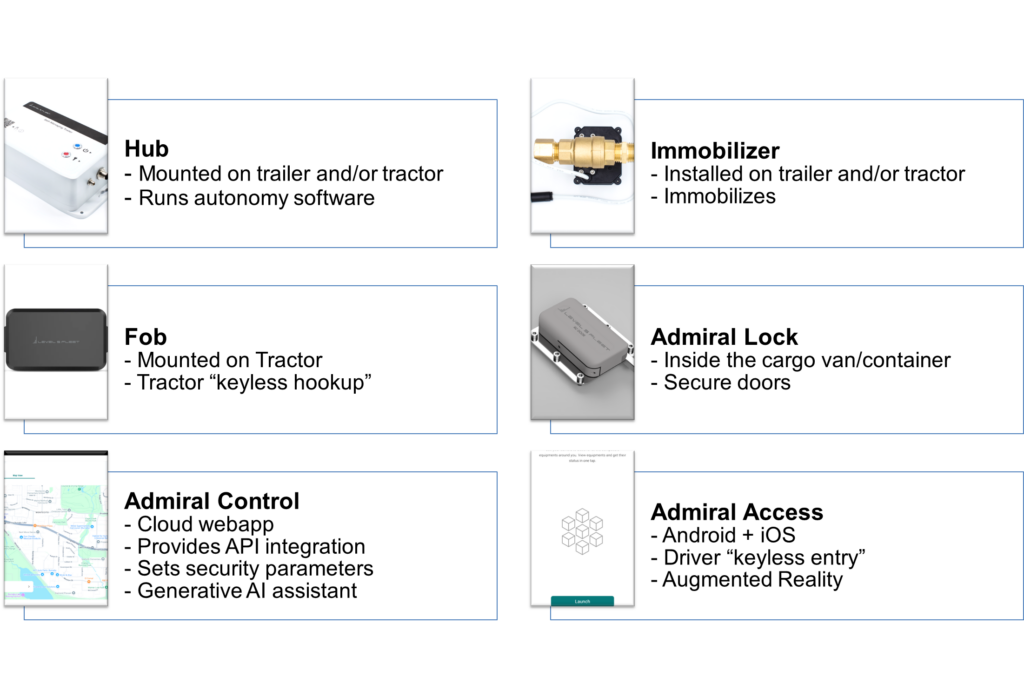
Admiral Trailer Security Suite
The Admiral Lock is dual powered, offering operational flexibility across varied scenarios. It is equipped with an internal battery that supports up to seven months of daily usage and can be easily replaced in the field with a fresh unit when depleted. For long-term storage applications, the battery maintains its charge for up to two years. Additionally, the Lock can be connected to the asset’s power supply to enable regular operation while also recharging the battery. In scenarios where battery usage is not desired, the Lock can also function exclusively using external power.
Safety Information
Warnings & Handling Instructions
Use only the power supply cable shipped with the Lock.
Connect only to 12V truck systems or approved adapters.
Contains a Lithium battery – follow proper storage, transportation, and disposal procedures.
The power switch must be OFF during storage and transportation.
Do not use the Lock if:
The security seal is broken.
The enclosure is damaged.
Fire Protection
The Lock is powered by a 3-cell lithium-ion battery and is classified under UN3481 for transportation safety. To ensure safe handling during transit and storage, an external power supply switch is provided to electrically isolate the battery when not in use.
When external power is connected, the battery recharges automatically. The charging system is engineered with two independent, redundant safety circuits that protect against overcharging, undercharging, and short circuits. Additionally, battery monitoring adheres to the JEITA ET-5600 standard, providing temperature-based charge regulation for enhanced safety.
To reduce fire risk and preserve battery health, the Lock limits its charging current to 0.25C—a conservative rate that prioritizes safety over speed. While charging at this rate is slower, it significantly reduces thermal stress and extends battery life. A full recharge may take up to four hours under standard conditions.
Charging is disabled when the ambient temperature falls below 0°C (32°F) to prevent lithium plating and ensure long-term reliability.
Important: Only use power supplies and cables approved by Level5Fleet. Using unapproved accessories may lead to overheating or fire, resulting in damage to the Lock, the vehicle, cargo, and nearby equipment.
Jamming Risk Assessment
Due to its interior installation, the Admiral Lock carries a risk of access obstruction if mechanical jamming occurs. In rare cases, a shift in the door’s position can prevent the Lock from actuating properly, potentially leading to a lockout scenario. To mitigate this risk, fleet managers must ensure that standard exterior door locks are always used to prevent door movement while the asset is in motion or unattended. Additionally, it is essential that the Lock mounting bracket is installed with adequate clearance, allowing the doors to settle naturally into position without placing stress on the locking mechanism. The bracket must accommodate minor variations in alignment when doors are closed and external locks are engaged.
Under no circumstances should the Admiral Lock be used as the primary structural component to bear or support door loads. Dedicated lock brackets must always be used to isolate the Lock from mechanical strain.
The Lock includes integrated sensors that monitor its operation and surroundings. If the door is not fully closed, the bracket is misaligned, or the mechanism encounters physical obstruction, the Lock will halt operation and generate an alert to prevent damage or mis-actuation.
When operating on battery power alone, timely replacement of the battery is critical to ensuring uninterrupted functionality. The Metrics Dashboard provides proactive battery warnings. If the battery is not replaced in time, the Lock will automatically unlock to prevent access denial.
Operation of the Admiral Lock is not permitted at internal temperatures below -15°C. Integrated temperature sensors continuously monitor conditions, and the Lock will automatically inhibit actuation when operating below this threshold to prevent mechanical stress and ensure long-term reliability.
To safeguard against wear and overheating, the Lock also enforces rate-limiting protections. If more than five actuations occur within a one-minute window, a mandatory cool-down period of ten minutes is triggered. This mechanism is designed to prevent damage from excessive or improper use, ensuring continued reliability of the locking mechanism.
Admiral Lock also includes continuous health monitoring. Indicators of early mechanical or electrical failure are surfaced on the dashboard, giving operators time to take corrective action. If the Lock determines a high risk of malfunction, it will default to an unlocked state as a fail-safe measure, preserving access to the asset.
Breaching Risk Assessment
The Admiral Lock is engineered to withstand significant physical force, with a breach resistance rated at approximately five tonnes of force. This high-strength construction provides robust protection against forced entry attempts. However, optimal installation practices are critical to ensuring the Lock’s protective effectiveness in real-world scenarios.
To minimize the likelihood of successful breaches, the Lock should be mounted on the upper portion of the door, where it is more difficult for unauthorized actors to access or cut through the vehicle or container body. This placement reduces the feasibility of creating an access hole or manipulating the Lock from the exterior.
In high-risk environments, such as container operations with elevated smuggling concerns, additional precautions should be taken. It is common in such scenarios for bad actors to bypass seals by cutting door hinges rather than breaking the seal itself. To counter this tactic, it is strongly recommended to install two Admiral Locks—one on each door—positioned on opposite ends (one at the top and the other at the bottom). This configuration prevents the removal of doors without breaching at least one seal, thereby preserving the integrity of seal-based tamper detection systems.
By combining strategic placement with multiple locking points, fleet operators can significantly reduce vulnerability to advanced breaching attempts.
Product Identifications
FCC ID:
2AC7Z-ESPS3WROOM2
Lock ID: The Lock ID is located under the Fleet Management Application in your Admiral Control Account. Login and navigate to Fleet Management, then select the asset to see Lock ID.
Technical Specifications
Power supply: 12V, 2A DC
Connectivity: 2.4G WiFi, Bluetooth LE
Battery life: 7months (daily use), 2 years (storage)
Charging time: 4 hours @ 2A
IP rating: IP66
Operating and Storage Temperature: -15°C to 55°C
Installation Guidelines & Operation
Admiral Lock supports multiple mounting configurations to accommodate different trailer, van and container door styles. A variety of purpose-designed brackets are available to ensure secure installation and proper alignment across all supported door types.
Door Types
Proper alignment and bracket selection are critical to reliable operation. Always ensure there is sufficient clearance and that brackets are mounted according to specifications for each door type to avoid jamming or misalignment during operation.
Swing Doors
For swing doors, the Lock can be mounted in several configurations depending on asset geometry and operational preferences. The most common setup involves mounting the Lock vertically, pointing upward, on the outer door—the one that interlocks with the other and must be opened first. The bracket is installed on the door frame near the center-top area to ensure secure engagement when the doors are closed.
Alternatively, the Lock may be mounted inside the door frame at the top, with the locking bolt oriented horizontally (left-to-right). In this configuration, a swing door bracket designed to align perpendicularly with the Lock when the door is closed must be used. This layout is particularly well-suited for assets where exterior mounting is not feasible or desirable.
For reefer trailers, the flat-profile of the Lock is designed to fit within the limited space between the refrigeration unit and the door. If the unit is positioned too close to the door to accommodate a vertical mount, the Lock may instead be installed horizontally, with the bracket attached to the opposite door for proper alignment.
Roll-Up Doors
For roll-up doors, the Lock should be installed on the side wall of the trailer body, just behind the vertical guide rails and near the lower section of the door. The locking bolt should face outward. The roll-up door bracket is mounted directly onto the roll-up door itself so that, when the door is closed, the bracket aligns precisely with the Lock’s bolt.
This position allows the door to rollup without the bracket interfering with the mechanism.
Side Sliding Doors
On side sliding doors, the Lock is installed on the trailer body just forward of the door opening, with the bolt facing upward. The sliding door bracket is affixed to the door such that when it is closed, the bracket sits directly over the Lock’s bolt, enabling secure engagement.
Operating Instructions
Operating instructions for the Admiral Lock are provided through Admiral Control’s Fleet AI Application. Fleet AI is a generative AI assistant designed to help you interact with and manage your Admiral system, offering tailored responses and step-by-step guidance based on your specific fleet configuration. It can assist with tasks related to fleet operations, security enforcement, and transportation management.
Fleet AI mirrors the functionality available through the traditional user interface, allowing you to complete the same actions more intuitively through conversational prompts.
To use Fleet AI, log in to your Admiral Control account and navigate to the Fleet AI section.
Lock Wake-Up Behavior
The Admiral Lock supports intelligent power management to balance accessibility with battery efficiency. Its wake-up behavior varies depending on the available power source and operational context.
When external power is connected, the Lock remains continuously awake. In this state, it is fully accessible via both the Admiral Access mobile app and remote systems through Admiral Control, enabling full remote management capabilities.
When operating solely on battery power, the Lock enters a low-power sleep mode during idle periods to conserve energy. While in sleep mode, remote access and remote wake-up are disabled. However, this is not a limitation in practice, as unlocking is typically performed by personnel on-site. The Lock can be woken in two ways: either through close-proximity interaction using the Admiral Access app or by detecting significant motion events, such as a container being lifted.
If the Lock is paired with an Admiral Hub, the Hub provides additional automation. Specifically, the Hub will wake the Lock automatically when entering or exiting designated geofenced areas, enabling autonomous locking and unlocking sequences without requiring user intervention.
Reliability Monitoring
The Lock includes embedded algorithms to continuously monitor the reliability. To enhance predictive diagnostics, the Lock collects and aggregates operational parameters from your fleet and, where applicable, from participating third-party fleets. This collective data improves the accuracy of reliability assessments across a wide range of operating conditions.
Monitored parameters include:
Operating temperature trends
Vibration profiles influenced by driving behavior and road surface conditions
Actuation times of the lock
Battery health indicators
Total operation cycles
Voltage and current consumption statistics
Using these insights, the system can identify signs of potential hardware degradation. When early indicators of failure are detected, you may receive a proactive notification through Admiral Control, allowing you to schedule hardware replacement before it affects fleet operations.
Metrics
Admiral Control provides a comprehensive monitoring dashboard through the Metrics & Reports Application. Security reports help identify and analyze trends related to loss prevention. Operational reports highlight recurring issues drivers face, such as denied access events, enabling fleet managers to refine workflows and improve employee experience.
Maintenance reports and associated trend analysis assist in forecasting maintenance needs and optimizing service schedules.
Troubleshooting
For issue resolution, use Admiral Control’s Fleet AI, which provides guided troubleshooting based on your specific fleet configuration. For issues not resolved through Fleet AI, contact Level5Fleet technical support.
Software Updates
The Lock receives software updates over the air (OTA), which require access to a configured WiFi network. When an update becomes available and the asset is idle within WiFi range, the Lock may automatically initiate the update process. A typical update takes approximately 10 minutes.
During updates, the door remains unlocked for safety.
To support planning, the maintenance dashboard highlights any Locks that are overdue for updates. Fleet managers should ensure these assets are within WiFi range during the next parked interval to complete the update.
Software Integration
For fleets using third-party Yard, Fleet, or Transportation Management Systems (YMS, FMS, TMS), Admiral supports seamless integration. You can generate an API integration key through the Account Management section of Admiral Control.
Privacy
Admiral enables you to transfer asset custody to or from other operators and to manage access permissions for third-party carriers and employees. By default, visibility across organizations is disabled, meaning other companies cannot grant you access unless explicitly allowed.
You can configure which external companies can view and interact with your organization for authorization purposes. These settings are managed within the Account Management section of Admiral Control.
This manual provides installation, operation, storage, and transport guidelines for the Admiral Hub. Please read this manual carefully before installing and operating the Hub.
Applicable Hardware Versions: Admiral Hub v1.5A (North America), v1.5B (Global)
Intended Audience: Fleet managers and operators
Purpose: Installation, operation, and safety guidelines for Admiral Hub
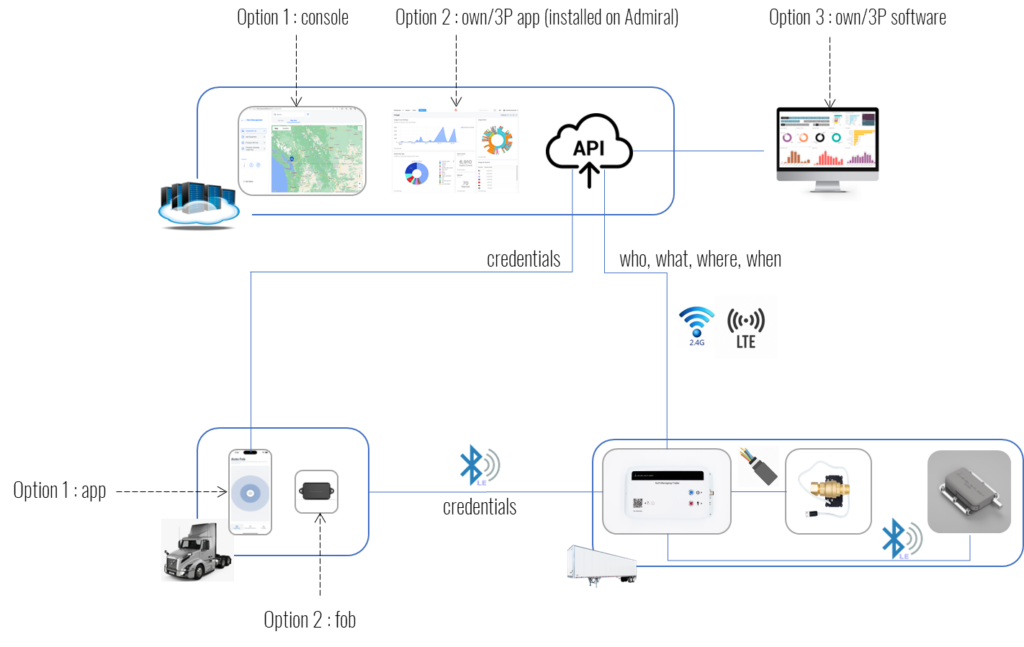
The Admiral Hub is a core component of Level5Fleet’s L4 autonomous security suite. It is installed on trailers and tractors to autonomously enforce security and safety protocols both in yards and while in transit. Through its control of immobilizers and door locks, the Hub can secure cargo and prevent unauthorized movement of assets. While the system continuously provides tracking visibility and telemetry, the decisions to authorize access or initiate lockdowns are made locally and autonomously by the Hub itself.
Fleet operators can shape the Hub’s behavior by configuring access parameters through the Admiral Control web application or by integrating with their logistics systems via API. This allows for centralized control while preserving the Hub’s autonomy in enforcing those parameters in real time.
Connectivity between the Hub and the cloud is enabled by an integrated SIM card, ensuring continuous communication regardless of location. Additionally, operators can configure WiFi networks for use in yard environments or with mobile hotspots while on the road.
The Hub supports flexible installation configurations and may be deployed with an immobilizer, a door lock, or both, depending on the security requirements. For detailed trailer-specific immobilization procedures, refer to the Admiral Hub Installation Guide for Trailers.
Use only the power supply cable shipped with the Hub.
Connect only to 12V truck systems or approved adapters.
Contains a Lithium battery – follow proper storage, transportation, and disposal procedures.
The power switch must be OFF during storage and transportation.
Use only with Level5Fleet-approved immobilizers.
Do not use the Hub if:
The security seal is broken.
The enclosure is damaged.
Fire Protection
The Hub is equipped with a single 8000mAh lithium-polymer battery and is classified under UN3481 for compliance with transportation regulations. To support safe handling during storage and transport, an external power supply switch is provided to fully isolate the battery from the system.
The battery is automatically recharged when external power is supplied. To ensure battery safety and longevity, the charging system incorporates two independent layers of redundant circuitry, safeguarding against overcharging, undercharging, and short circuits. Battery monitoring adheres to the JEITA ET-5600 standard, which dynamically regulates charging behavior based on temperature.
While lithium-ion batteries can safely charge at rates up to their full capacity (1C), the Hub limits its charging current to 0.25C to minimize thermal stress and extend battery life. This conservative charging rate prioritizes safety and reliability over speed, resulting in a full recharge time of approximately six hours—a duration that conveniently matches a typical haul period.
To prevent damage under extreme conditions, the Hub disables battery charging when the ambient temperature falls below 0°C (32°F). In such conditions, if external power is also disconnected and the battery reaches a 20% charge level, telemetry and visibility functions will be temporarily suspended until power or temperature conditions improve.
Important: Only use power supplies and cables approved by Level5Fleet. Use of unapproved accessories may cause fire or serious damage to the Hub, the vehicle, cargo, or nearby property.
Immobilization Risk Assessment
When configured for immobilization, the Hub controls the vehicle’s parking brakes by managing air flow through the spring brake supply line. A dedicated valve is installed on this line to prevent the release of the parking spring, effectively immobilizing the asset until authorized to move.
It is important to note that this valve does not interact with or control the service brakes, ensuring that standard braking operations remain unaffected during immobilization.
In scenarios where the optional anti-hijacking configuration is enabled, the Hub may actively vent air from the spring brake circuit to the atmosphere, engaging the parking spring and bringing the asset to a controlled stop.
To ensure operational safety, the valve used for immobilization is a through-type, electrically actuated ball valve that meets the SAE J1409 standard for air brake systems. It is rated for reliable performance within a temperature range of -15°C to +105°C.
Important: Do not use immobilization functions in environments where temperatures fall below -15°C. At such temperatures, the valve may become sluggish or stick, potentially preventing the release of the parking brake and disrupting asset movement. If the asset will remain stationary during sub-zero conditions, immobilization can be enabled and left engaged until temperatures rise above the safe operating threshold.
The following information is provided to support safety risk assessment and operational planning related to the Hub’s immobilization functionality.
Valve Leaks
Because the immobilization valve is a through-type ball valve, it functions as a passive device when not energized. Standard safety practices for air brake fittings and tubing should be followed during installation and maintenance. Any potential leaks in the system can be identified through routine pre-trip inspections and by monitoring in-cab low-pressure warning indicators.
The valve is engineered for long-term reliability, with a rated service life of 100,000 actuation cycles—equivalent to approximately 27 years of typical operation. It is designed to withstand system pressures up to 200 psi. Pressure regulation and over-pressure protection are the responsibility of the vehicle’s existing air brake relief valve system, as the immobilization valve does not include integrated pressure-limiting features.
Emergency Braking
When not configured in anti-hijacking mode, the valve remains open for the entirety of the trip once activated. During this time, all emergency braking functions operate normally. To ensure safety and prevent accidental closure, the valve utilizes a ball-type design that requires intentional electric energization to actuate.
A potential hazard could arise if the valve were to energize inadvertently after a failure of the vehicle’s service brakes and before the driver has engaged the emergency braking system. In such a scenario, the driver might be unable to apply the emergency brakes, increasing the risk of an incident.
To mitigate this risk, the Hub employs a triple-redundant verification system to determine whether the vehicle is in motion. A failure scenario that could lead to an unintended valve actuation would require the simultaneous occurrence of all the following events:
GNSS data erroneously indicates that the vehicle is stationary.
The MEMS sensor responsible for detecting acceleration and motion incorrectly registers the vehicle as stopped.
The vehicle experiences a total electrical failure, including alternator and battery failure, a disconnected or severed power cable, or an intentional shutdown of the power supply by the driver.
A complete failure of the vehicle’s service brakes occurs.
The driver does not manually engage the emergency brakes within two minutes.
Important: If, at the end of a trip, the asset is parked in an area without GNSS signal, such as an underground facility, the immobilizer will not engage automatically. Fleet operators must instruct drivers to manually engage the immobilizer in such cases. Manual engagement is performed via the Admiral Access mobile app, which requires the driver to be physically present at the asset. In that scenario, remote engagement after leaving the vehicle is not possible.
Cyber Security & Remote Activation
The Hub’s design philosophy prioritizes “autonomy over remote control.” As a fleet owner, you do not have direct control to forcefully enable or disable immobilization remotely. Instead, you may issue a request to the Hub, which will execute the action only when it determines that the conditions are safe. For example, the Hub will reject any immobilization or release request if the asset is currently in motion or actively powered.
To maintain system integrity and prevent unauthorized actions—such as disabling immobilization, revoking employee access, or locking out legitimate users—it is critical to protect your Admiral Control account. Never share account credentials, and ensure strong authentication practices are followed to safeguard against malicious access.
Hub Tampering
The Hub uses encryption and security keys that are uniquely tied to your Admiral Control account. It will only accept access parameters that originate from your authenticated account. Likewise, your account is restricted from sending parameters to any Hub that is not securely linked to it, ensuring a mutual trust relationship between device and account.
However, if an unauthorized actor gains physical access to your asset and replaces the original Hub with their own hardware, they may be able to use custom software to operate the immobilization valve outside of your control. For this reason, physical security of the Hub is essential to maintaining the integrity of your asset. Always inspect the asset for tampering.
Forced Stops (Anti-Hijacking Mode Only)
In anti-hijacking mode, the Hub can be instructed to enforce adherence to a designated route for a specific load assigned to the asset. This enforcement request must be tied to an active load and is managed either through Admiral Control’s Transportation Management Application or via your own integrated TMS. Once the trip is completed, route enforcement is automatically disabled.
The system uses a default route deviation tolerance of 75 meters (246 feet), which can be adjusted—either tightened or relaxed—at specific points along the route using configurable geofences.
If the vehicle deviates from the assigned route and its speed drops below 20 km/h (12 mph), the Hub initiates a controlled air leak. This action gradually reduces system air pressure, ultimately re-engaging the spring brake and bringing the asset to a stop. The driver will be alerted through standard in-cab low-pressure warning indicators as the leak process begins.
To resume the trip, the driver must contact dispatch and receive a one-time release code. Once authorized, they have 12 minutes to return to the assigned route. If they fail to do so within that timeframe, another call and a new release code will be required.
If the driver maintains high speed during a deviation, the protection mechanism does not engage to avoid creating a hazard. In cases where both GNSS systems are jammed or spoofed to manipulate location data, the Hub switches to dead-reckoning mode using its onboard magnetometer to estimate route adherence. Due to the reduced accuracy of this method, there is a possibility that the asset could be immobilized even if it has not deviated from the route.
Important: Drivers must be explicitly instructed not to use GNSS jamming or spoofing devices, as this can lead to false immobilization events.
While GNSS jamming or spoofing from external third-party actors is generally localized and limited in impact, the Hub mitigates such risks by using two independent GNSS systems for redundancy.
Product Identifications
FCC IDs:
XPYUBX19KM01
2AC7Z-ESPS3WROOM2
Hub ID: The Hub ID is located under the Fleet Management Application in your Admiral Control Account. Login and navigate to Fleet Management, then select the asset (tractor or trailer) to see Hub ID.
Technical Specifications
Power supply: 12V, 2A DC
Connectivity:
HW version 1.5A (North America)
LTE-M, 2.4G WiFi, Bluetooth LE
HW version 1.5B (Global)
LTE-M, NB2, 2.4G WiFi, Bluetooth LE
GNSS accuracy: 10cm
Battery life: 30-60 days
Charging time: 6 hours @ 2A
IP rating: IP65
Operating and Storage Temperature: -35°C to 55°C
Installation & Operation
Trailer Installation
To install the Hub, please follow instructions in Admiral Hub Installation Guide for Trailers. If you are not installing the immobilizer, you can skip section C in the guide.
Operating Instructions
Operating instructions for the Admiral Hub are provided through Admiral Control’s Fleet AI Application. Fleet AI is a generative AI assistant designed to help you interact with and manage your Admiral system, offering tailored responses and step-by-step guidance based on your specific fleet configuration. It can assist with tasks related to fleet operations, security enforcement, and transportation management.
Fleet AI mirrors the functionality available through the traditional user interface, allowing you to complete the same actions more intuitively through conversational prompts.
To use Fleet AI, log in to your Admiral Control account and navigate to the Fleet AI section.
Reliability Monitoring
The Hub includes embedded algorithms to continuously monitor the reliability of both the Hub itself and the immobilizer, if installed. To enhance predictive diagnostics, the Hub collects and aggregates operational parameters from your fleet and, where applicable, from participating third-party fleets. This collective data improves the accuracy of reliability assessments across a wide range of operating conditions.
Monitored parameters include:
Operating temperature trends
Vibration profiles influenced by driving behavior and road surface conditions
Actuation times for immobilizer components
Battery health indicators
Total operation cycles
Voltage and current consumption statistics
Using these insights, the system can identify signs of potential hardware degradation. When early indicators of failure are detected, you may receive a proactive notification through Admiral Control, allowing you to schedule hardware replacement before it affects fleet operations.
Metrics
Admiral Control provides a comprehensive monitoring dashboard through the Metrics & Reports Application. Security reports help identify and analyze trends related to loss prevention. Operational reports highlight recurring issues drivers face, such as denied access events, enabling fleet managers to refine workflows and improve driver experience.
Maintenance reports and associated trend analysis assist in forecasting maintenance needs and optimizing service schedules.
Troubleshooting
For issue resolution, use Admiral Control’s Fleet AI, which provides guided troubleshooting based on your specific fleet configuration. For issues not resolved through Fleet AI, contact Level5Fleet technical support.
Software Updates
The Hub receives software updates over the air (OTA), which require access to a configured WiFi network. When an update becomes available and the asset is idle within WiFi range, the Hub may automatically initiate the update process. A typical update takes approximately 10 minutes.
If the Hub is configured with an immobilizer, the asset remains locked during the update for safety. Drivers can confirm whether an update is in progress by checking the Admiral Access mobile app.
To support planning, the maintenance dashboard highlights any Hubs that are overdue for updates. Fleet managers should ensure these assets are within WiFi range during the next parked interval to complete the update.
Software Integration
For fleets using third-party Yard, Fleet, or Transportation Management Systems (YMS, FMS, TMS), Admiral supports seamless integration. You can generate an API integration key through the Account Management section of Admiral Control.
Privacy
Admiral enables you to transfer asset custody to or from other operators and to manage access permissions for third-party carriers and employees. By default, visibility across organizations is disabled, meaning other companies cannot grant you access unless explicitly allowed.
You can configure which external companies can view and interact with your organization for authorization purposes. These settings are managed within the Account Management section of Admiral Control.